SUBSMART
SUBSMART
A web app to enable AMBC Limited Bricklayers and subcontractors to provide staff onboarding accreditations, book in lifts and submit lift completion for payment. Management of bricklaying jobs will be key to enabling AMBC to maintain Bricklayers compliance, assess and approve work to pay according to lift completion.
A web app to enable AMBC Limited Bricklayers and subcontractors to provide staff onboarding accreditations, book in lifts and submit lift completion for payment. Management of bricklaying jobs will be key to enabling AMBC to maintain Bricklayers compliance, assess and approve work to pay according to lift completion.
Role
Solo product designer
Solo product designer
Platform
Mobile & Web
Mobile & Web
Timeline
August 2025 - November 2025
August 2025 - November 2025
Client
AMBC Limited
AMBC Limited

Problem statement
Problem statement
AMBC (SubSmart) heavily dependends on manual processes, disconnected tools, and paper-based workflows to manage site operations, workforce coordination, compliance, and project tracking. This led to delays in communication, reduced visibility across projects, inefficient task management, and difficulties in maintaining operational consistency between teams and contractors.
The client needed a scalable digital platform that could simplify day-to-day construction workflows, improve collaboration between stakeholders, and help multiple construction businesses adopt a more structured and efficient way of working through a subscription-based solution.
AMBC (SubSmart) heavily dependends on manual processes, disconnected tools, and paper-based workflows to manage site operations, workforce coordination, compliance, and project tracking. This led to delays in communication, reduced visibility across projects, inefficient task management, and difficulties in maintaining operational consistency between teams and contractors.
The client needed a scalable digital platform that could simplify day-to-day construction workflows, improve collaboration between stakeholders, and help multiple construction businesses adopt a more structured and efficient way of working through a subscription-based solution.
Understanding client business
Understanding client business
A questionnaire was created to gather the required information about the target users, understand how the current business operates, identify problems in the existing workflow, and gain insights into the target users.
Six people were interviewed: 4 Bricklayers, 1 Gang leader, 1 Site supervisor. User interviews were conducted on site of a client.
AMBC (SubSmart) heavily dependends on manual processes, disconnected tools, and paper-based workflows to manage site operations, workforce coordination, compliance, and project tracking. This led to delays in communication, reduced visibility across projects, inefficient task management, and difficulties in maintaining operational consistency between teams and contractors.
The client needed a scalable digital platform that could simplify day-to-day construction workflows, improve collaboration between stakeholders, and help multiple construction businesses adopt a more structured and efficient way of working through a subscription-based solution.
Questionnaire created for bricklayers, gang leader and site supervisor
Questionnaire created for bricklayers, gang leader and site supervisor
Workflow & Site Operations
Can you walk us through the current process followed to complete lifts on site?
How are bricklayers typically assigned across different plots or areas of the site?
What are the most common challenges or inefficiencies you experience during daily site operations?
How is work progress currently tracked, reviewed, and confirmed on site?
Can you walk us through the current process followed to complete lifts on site?
How are bricklayers typically assigned across different plots or areas of the site?
What are the most common challenges or inefficiencies you experience during daily site operations?
How is work progress currently tracked, reviewed, and confirmed on site?
Compliance & Documentation
Who is responsible for managing and verifying site-related documents and compliance checks?
What types of documents or certifications are required before starting work on site?
Who is responsible for managing and verifying site-related documents and compliance checks?
What types of documents or certifications are required before starting work on site?
Technology Usage & Accessibility
How frequently do you use a mobile phone or digital tools while working on site?
What challenges do you face when using a mobile device on site, particularly while wearing gloves or safety equipment?
How frequently do you use a mobile phone or digital tools while working on site?
What challenges do you face when using a mobile device on site, particularly while wearing gloves or safety equipment?
Outcome
Outcome
Manual process
Bricklayer records the completion of work on paper. It’s difficult to handle paper copy during bad whether or due to the wet site conditions.
Bricklayer records the completion of work on paper. It’s difficult to handle paper copy during bad whether or due to the wet site conditions.
Time consuming
Time consuming for supervisor to mark and approve work done.
Manual process of calculation and creating invoice.
Time consuming for supervisor to mark and approve work done.
Manual process of calculation and creating invoice.
Document check
Hard for gang leader to keep record of all bricklayers. Often need to check expiry of all the bricklayers document and update information with Admin.
Hard for gang leader to keep record of all bricklayers. Often need to check expiry of all the bricklayers document and update information with Admin.
Pain points
Manual onboarding
ID checks, CSCS checks (and ongoing management) can be time consuming and unreliable.
Inaccuracy
The current process lacks transparency for all parties and possible inaccurate.
Difficult for bricklayers
It can be difficult when bricklayers leave or join, particularly in calculating their payments.
Payment processing is too long
Manual nature of the calculation, and also the calculation of CIS and getting UTRs can be painful.
Project goals
Streamline admin work
Streamline the AMBC admin work online without having to manually work out outstanding work.
Sign offs and approval
Breaking each lift within a job down into increments (25% ,50%, 75% and 100%) once the completion level is marked.
Updated information
Ensure all bricklayers on site are compliant and have their accreditations up to date (ID checks, CSCS checks).
Intuitive design
Ensure the app is simple enough for the bricklayers to use as they’re not good with technology.
User personas
User personas
Three user personas were created for Admin, Supervisor, and Subcontractor/Bricklayer to ensure user-centric decision-making throughout the project by understanding their goals and painpoints. Below is an example of Subcontractor/Bricklayer.
Three user personas were created for Admin, Supervisor, and Subcontractor/Bricklayer to ensure user-centric decision-making throughout the project by understanding their goals and painpoints. Below is an example of Subcontractor/Bricklayer.

James Dudson
Subcontractor/Bricklayer
Age : 28
Goals
Maintain a clear digital record of all work completed on-site, ensuring nothing is missed or lost in manual reporting.
Track and update progress of lifts completed by both himself and his team in a structured and easy-to-access format.
Enable quick updates in real time, reducing dependency on paperwork or end-of-day reporting.
Pain Points
Lack of a centralized system to track lift progress, leading to confusion between team members and missed updates.
Time-consuming reporting process, especially when updates are only recorded at the end of the day or week.
Challenges in verifying completed work when documentation is inconsistent or incomplete.
Project scope
User journey mapping
Three user journeys were created for three distinct user roles: Admin, Supervisor, and Subcontractor/Bricklayer. Below is an example of the user journey developed for the Subcontractor/Bricklayer role.
Stages
Before the site work
During the site work
After the site work
Actions
Jacob get’s contacted for a site work as a Bricklayer.
Progress done on Lifts is marked & shared with supervisor
Invoice created is sent to Admin to process payment.
Jacob and gang is ready for next site work
After receiving payment, contract ends with Admin.
All the details about the site and work is sent to him.
Jacob & his gang starts working on site.
Based on marked progress, every Friday invoice is created.
Jacob accepts job & share all the site details with gang members
Design phase
Design phase
After aligning with the client on the project scope, key features, and business requirements, and ensuring all necessary insights had been gathered through the discovery phase, the project moved into the design phase to begin translating requirements into user-focused solutions.
After aligning with the client on the project scope, key features, and business requirements, and ensuring all necessary insights had been gathered through the discovery phase, the project moved into the design phase to begin translating requirements into user-focused solutions.
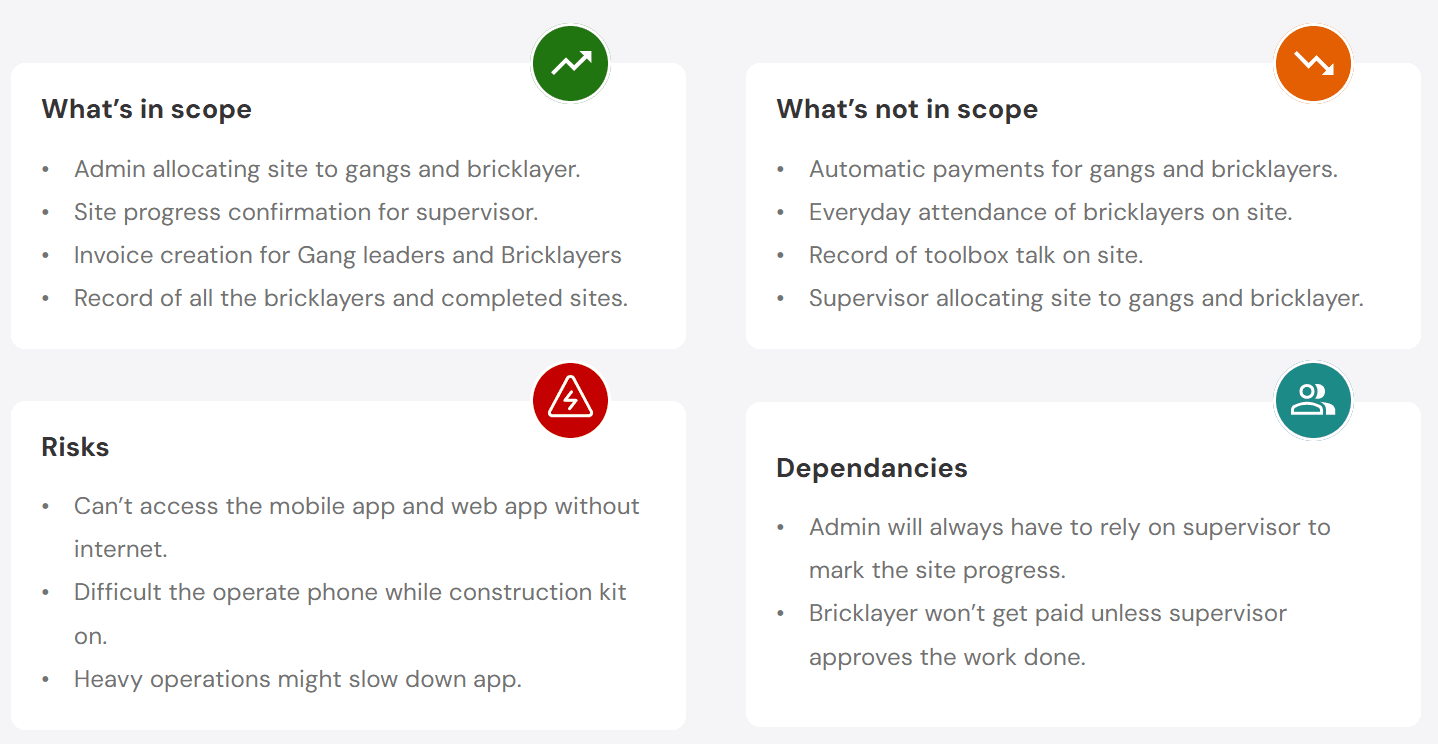
Project scope
What’s in scope
Admin allocating site to gangs and bricklayer.
Site progress confirmation for supervisor.
Invoice creation for Gang leaders and Bricklayers
Record of all the bricklayers and completed sites.
What’s not in scope
Automatic payments for gangs and bricklayers.
Everyday attendance of bricklayers on site.
Record of toolbox talk on site.
Supervisor allocating site to gangs and bricklayer.
Risks
Can’t access the mobile app and web app without internet.
Difficult the operate phone while construction kit on.
Heavy operations might slow down app.
Dependancies
Admin will always have to rely on supervisor to mark the site progress.
Bricklayer won’t get paid unless supervisor approves the work done.
Mapping key features
Mapping key features
Bricklayers/Subcontractors (Mobile App)
Profile creation
Ability to create and add gang members
Job Overview
Overview of jobs & workers allocated to different jobs/site
Job submission
Ability to submit lifts / jobs for approval.
Invoice procession
Ability to create invoice and send it to admin for processing.
Site Manager (Mobile App)
Delete profile
Ability to remove subcontractor profile.
Job Overview
Overview of jobs & workers allocated to different jobs/site
Approval
Ability to review & approve completed lifts/jobs
Amend progress
Ability to amend progress of lifts/jobs submitted.
Admin panel (Web app)
Profile creation
Ability to create profile for subcontractors and bricklayers
Expiry reminders
CSCS, UTR and CIS check and ability to send reminders when expiring
Job creation
Ability to input a plot number, input price list for jobs, the total cost for house build
Create gangs
Ability to create “gangs” (group of worker working on a job together)

User flows
User flows
Based on the defined user personas and user journeys, detailed user flows were created to map the end-to-end experience for each user type. These flows covered key features and interactions, from onboarding through to task completion, while helping identify blockers, friction points, and opportunities for usability improvements.
Based on the defined user personas and user journeys, detailed user flows were created to map the end-to-end experience for each user type. These flows covered key features and interactions, from onboarding through to task completion, while helping identify blockers, friction points, and opportunities for usability improvements.

Wireframing & testing
Wireframing & testing
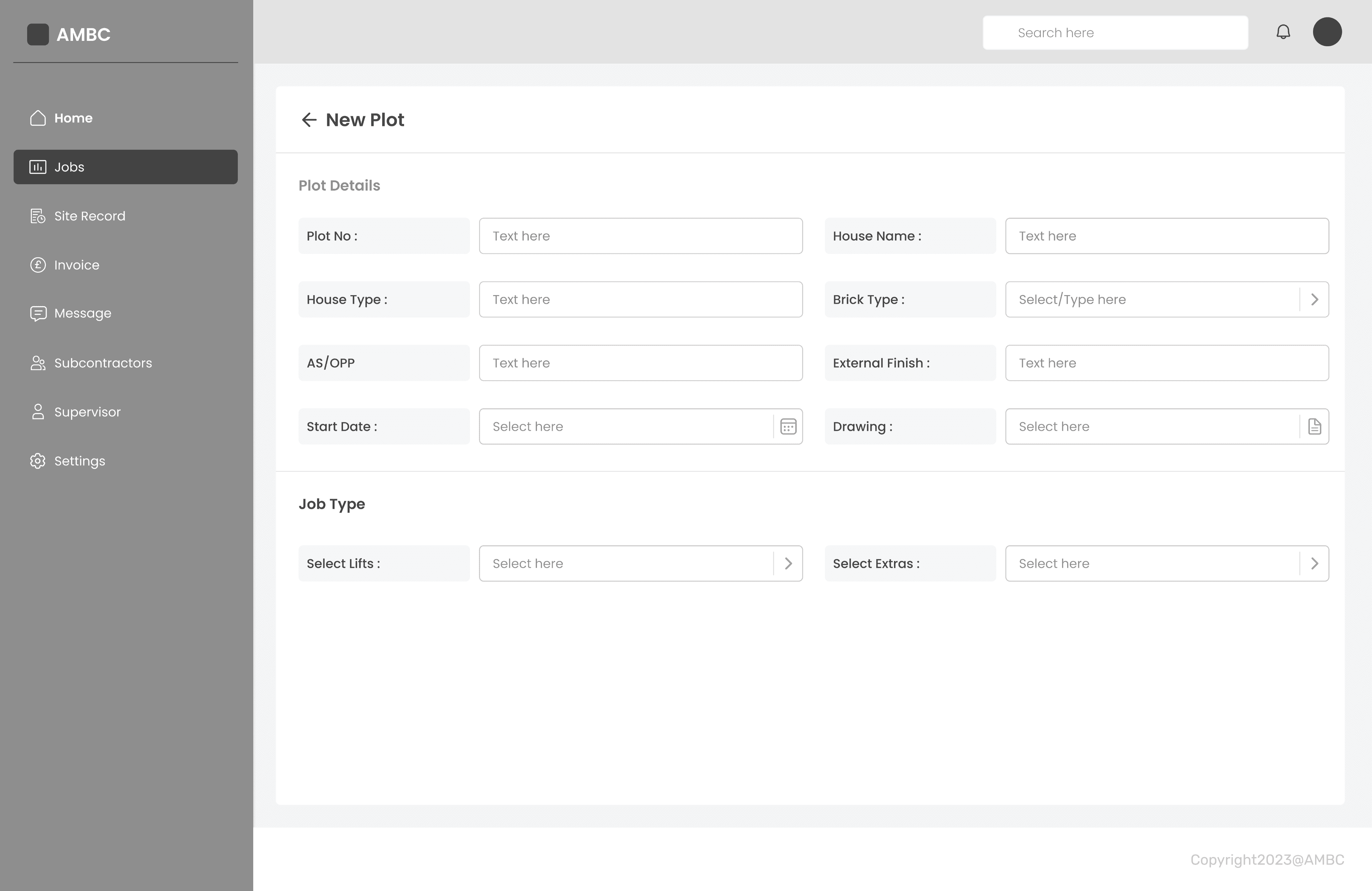
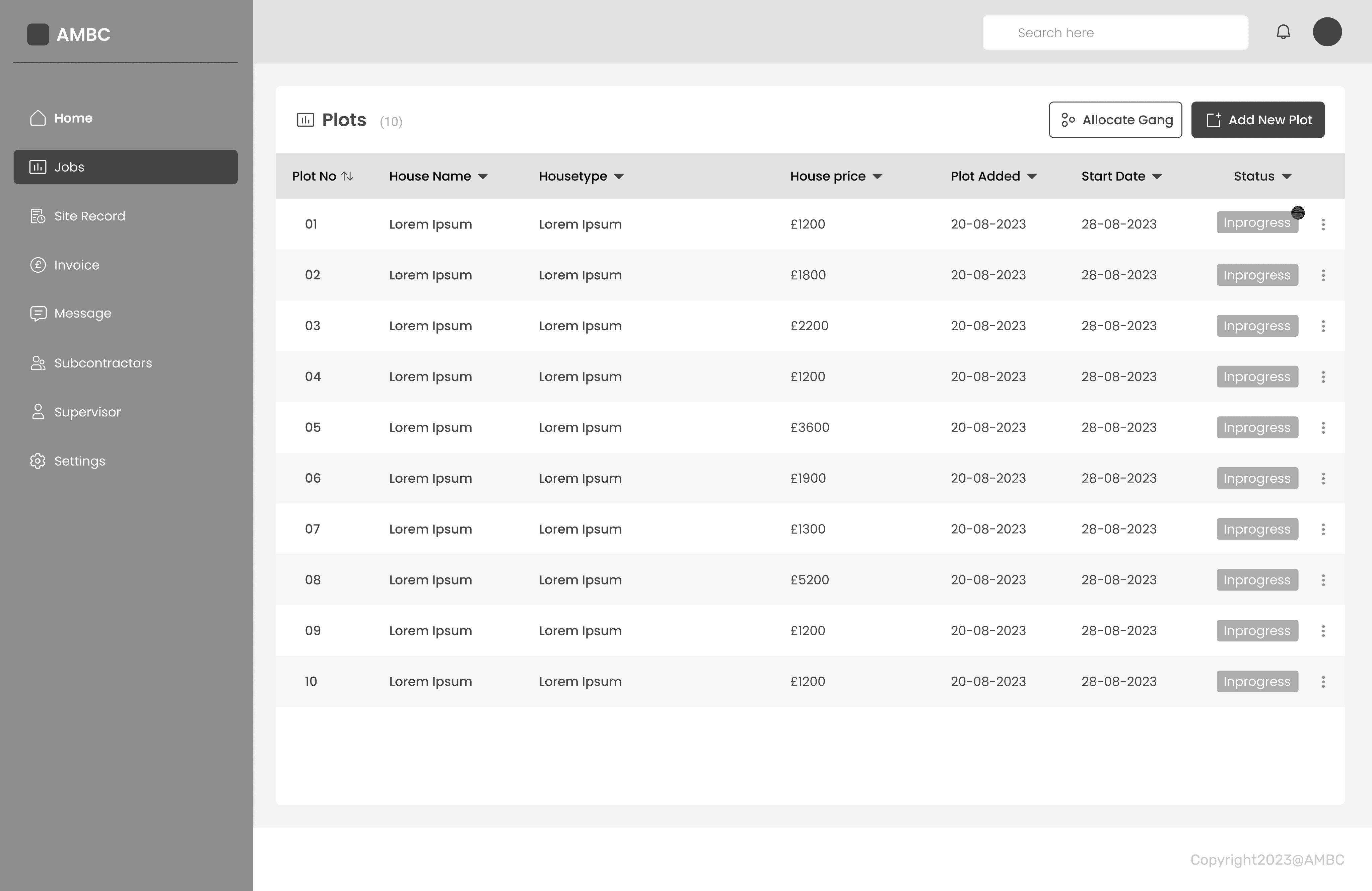
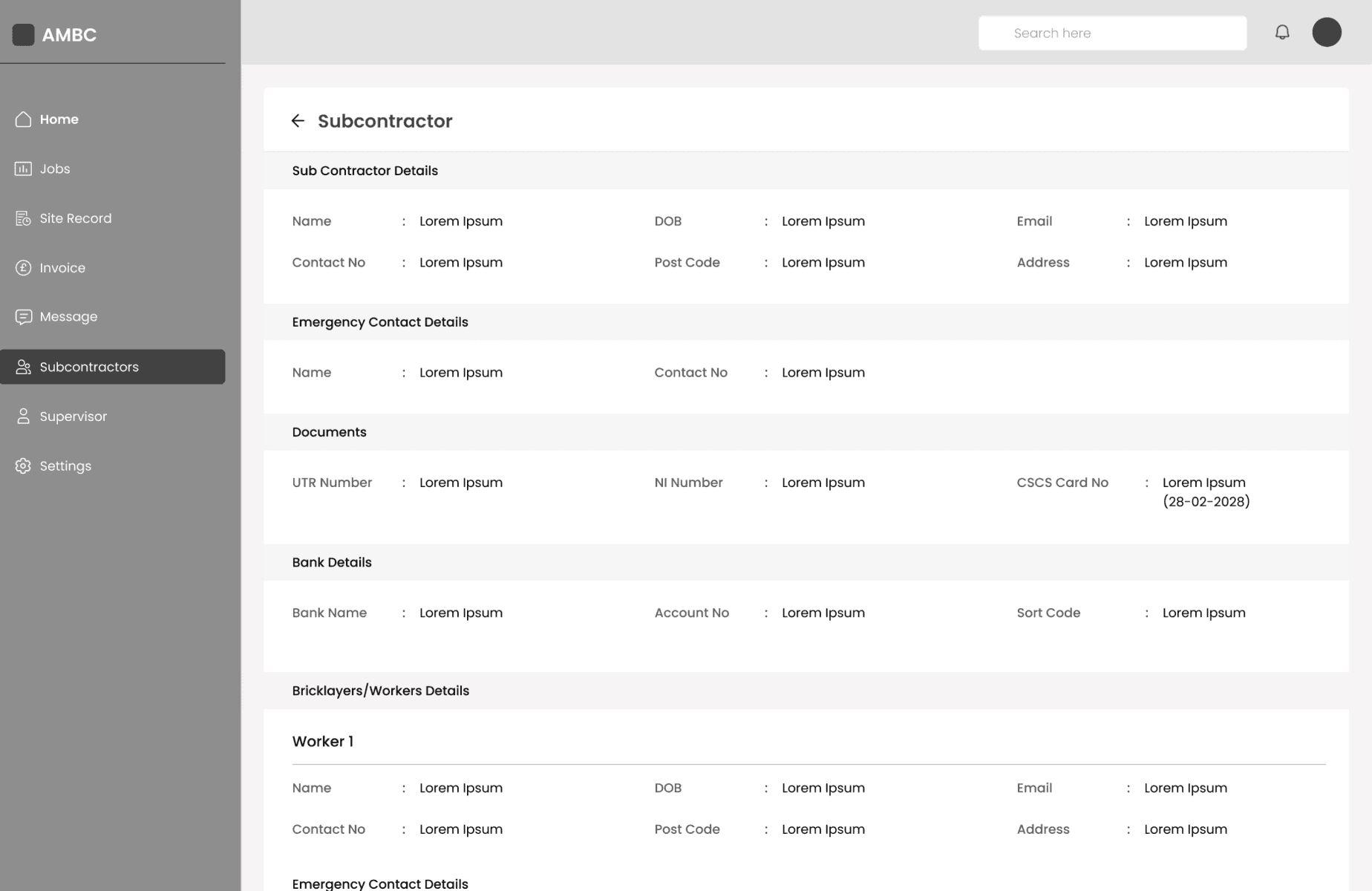
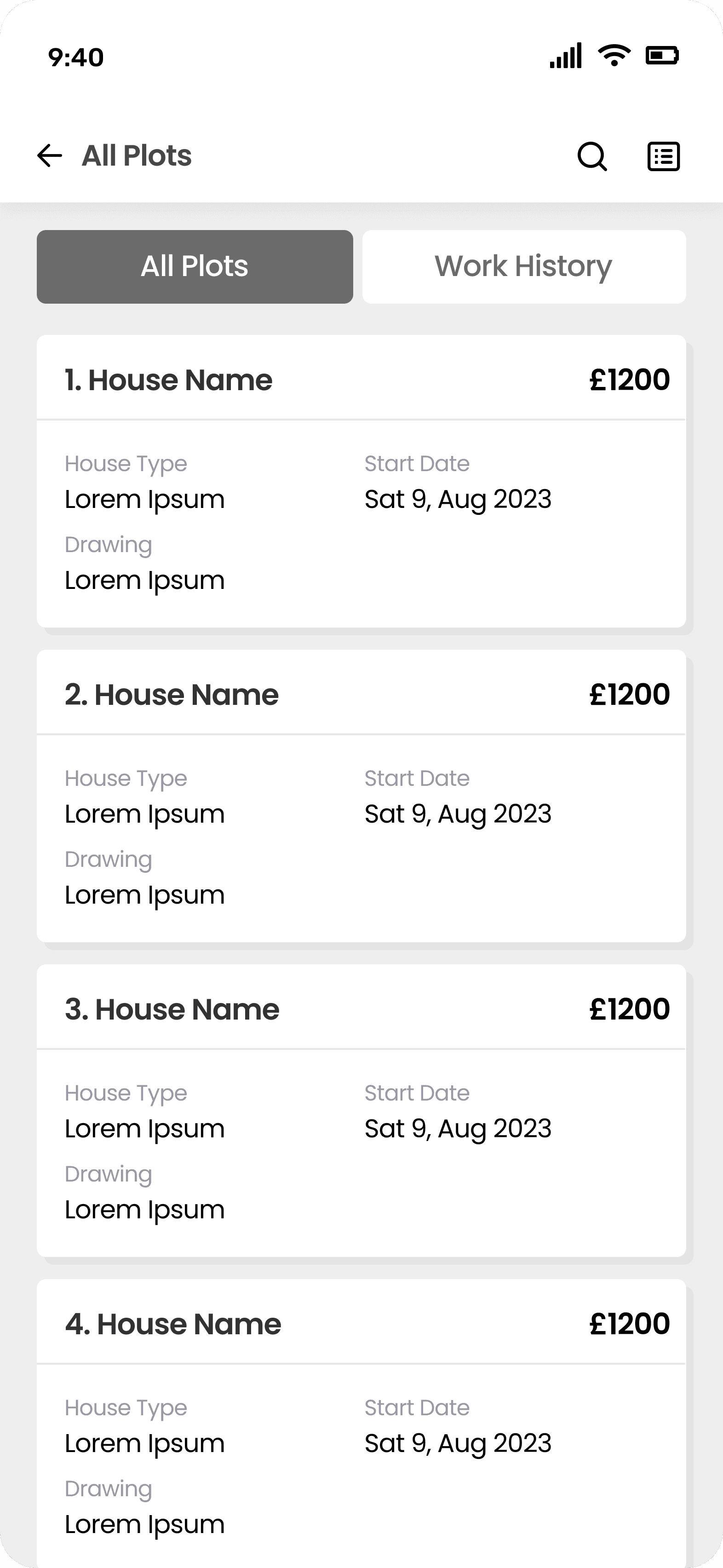
The design phase began with creating wireframes and exploring multiple solution approaches to address the identified user and business needs. Collaborative sessions with developers were conducted to ensure all proposed features were technically feasible and achievable within the project scope. Continuous feedback from the client was incorporated throughout the process, and iterative design changes were made to align the solution with evolving requirements and expectations.
The design phase began with creating wireframes and exploring multiple solution approaches to address the identified user and business needs. Collaborative sessions with developers were conducted to ensure all proposed features were technically feasible and achievable within the project scope. Continuous feedback from the client was incorporated throughout the process, and iterative design changes were made to align the solution with evolving requirements and expectations.
Visual design & branding
Visual design & branding
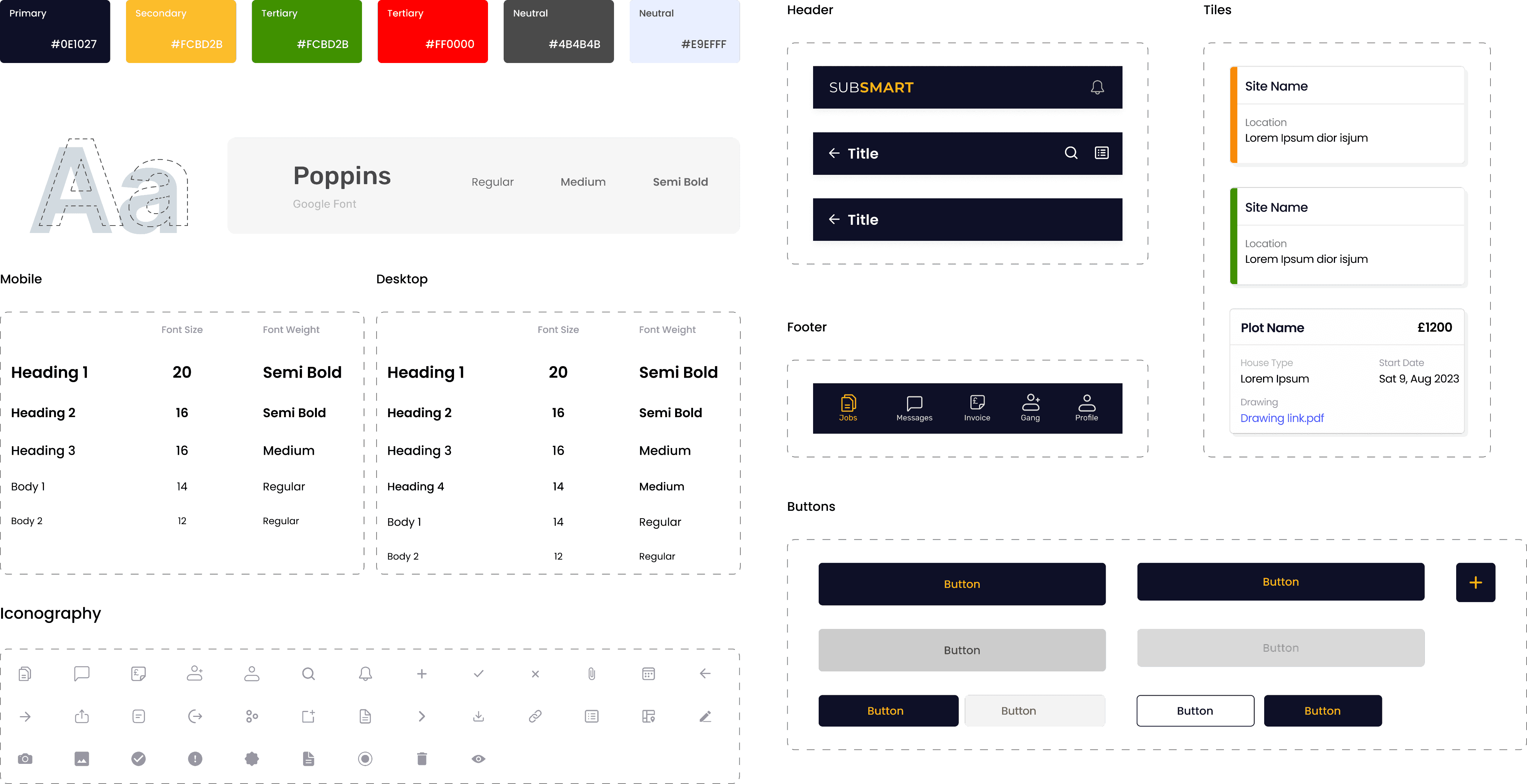
A design system was created using one primary, two secondary, and three neutral colours to ensure visual consistency across the platform. Poppins was selected as the primary typeface for its clean appearance and strong legibility. Core UI components including headers, tiles, footers, buttons, and icons were also designed to maintain consistency and scalability.
These elements were then applied to the low-fidelity wireframes to develop the final high-fidelity designs.
A design system was created using one primary, two secondary, and three neutral colours to ensure visual consistency across the platform. Poppins was selected as the primary typeface for its clean appearance and strong legibility. Core UI components including headers, tiles, footers, buttons, and icons were also designed to maintain consistency and scalability.
These elements were then applied to the low-fidelity wireframes to develop the final high-fidelity designs.
Components Library
Components Library
High fidelity designs
High fidelity designs
Following successful approval of the wireframes and colour palette, the project progressed into the high-fidelity design phase.
Following successful approval of the wireframes and colour palette, the project progressed into the high-fidelity design phase.
Onboarding - Admin
Easy and efficient onboarding for admin.
Creating jobs & allocating subcontractor/gang- Admin
Preparing and sharing a new list of sites with the subcontractors took considerable time.
Admin now can create sites in the web app and easily share and allocate worker to the site reducing extra effort and time.
Keeping record of all completed sites- Admin
Current documentation of completed site record was chaotic and messy. Now admin can keep the digital record of all the completed sites.
Accessing jobs and marking the work progress - Subcontractor
Initially this was done on paper, now subcontractor can access jobs via app and mark the work progress within the app which can be seen by Site supervisor and Admin.
Approving the work of subcontractors - Supervisor
Supervisor used to approve the work progress by marking it on paper and used to inform Admin about the progress. Now supervisor can approve the work in app which will automatically notify admin and subcontractors about the site progress.
Design handover
Design handover
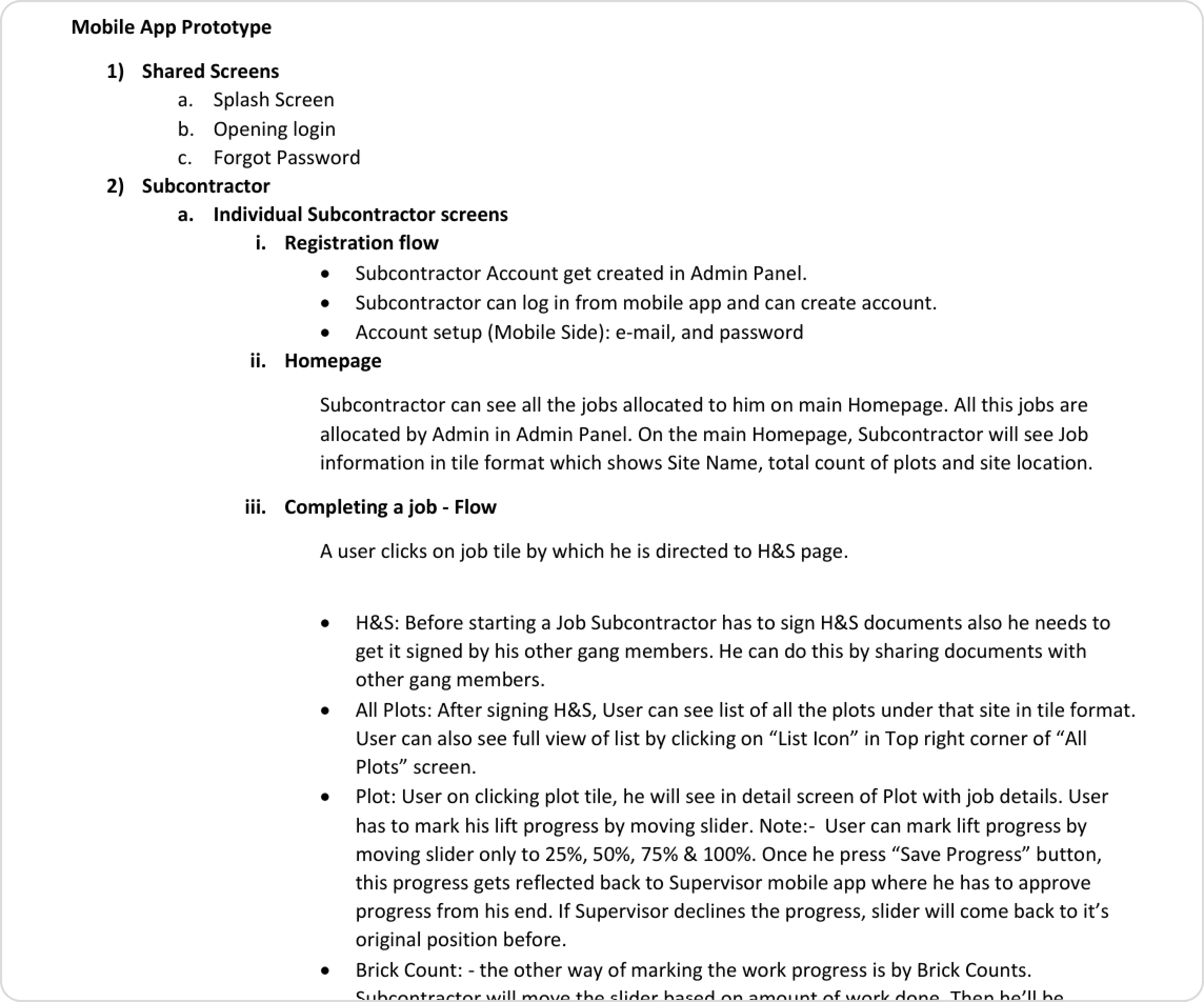
The handover document was created with the recordings explaining each and every functionality in the flow. The prototype was also added which majorly helped in the handover meeting as it was easier to explain the process to the dev team.
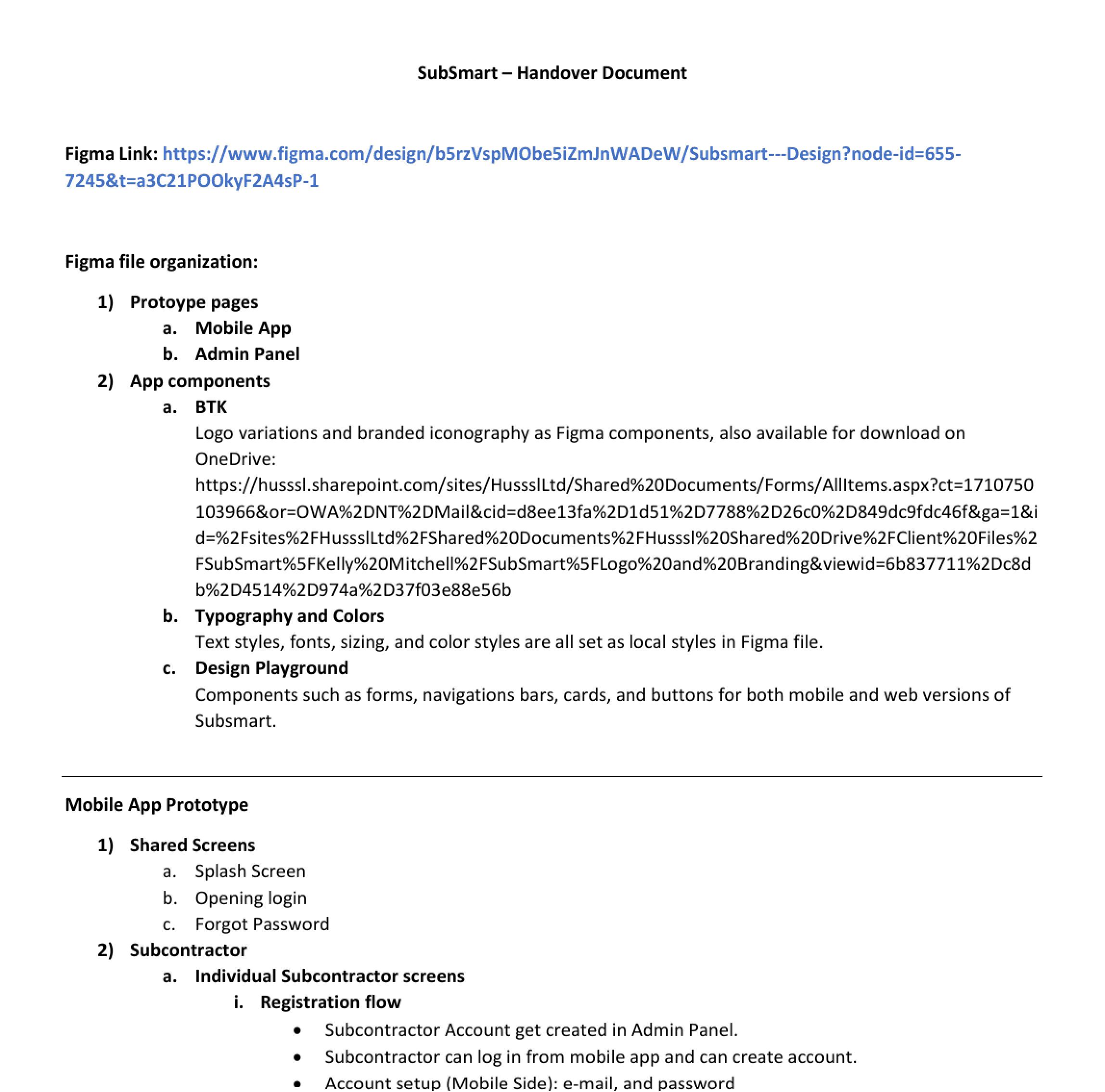
A separate handover document was created with added annotations and explanation of each screen. The project handover was made in four phases covering all the core features of Subcontractors mobile app, Supervisors mobile app and Admin panel.
The handover document was created with the recordings explaining each and every functionality in the flow. The prototype was also added which majorly helped in the handover meeting as it was easier to explain the process to the dev team.
A separate handover document was created with added annotations and explanation of each screen. The project handover was made in four phases covering all the core features of Subcontractors mobile app, Supervisors mobile app and Admin panel.
Usability testing & outcome
Usability testing & outcome
Internal QA testing
Internal QA testing
Usabilitiy testing was conducted with Admin, Subcontractors and Supervisor to validate designs.
The onboarding process was quicker and more efficient compared to the traditional process.
Users were able to receive notifications easily whenever a new job was posted or allocated.
Users provided positive feedback regarding the overall user interface and visual design.
The platform improved communication and visibility of task updates for users.
Usabilitiy testing was conducted with Admin, Subcontractors and Supervisor to validate designs.
The onboarding process was quicker and more efficient compared to the traditional process.
Users were able to receive notifications easily whenever a new job was posted or allocated.
Users provided positive feedback regarding the overall user interface and visual design.
The platform improved communication and visibility of task updates for users.
Outcome
Outcome
Reduced manual administrative workload by digitising onboarding, compliance tracking, and approval workflows by 70%
Simplified the onboarding process 50% more faster for bricklayers by centralising ID checks, CSCS verification, and accreditation management.
Improved transparency and accuracy within the payment and sign-off process through structured milestone tracking (25%, 50%, 75%, and 100% completion stages).
The solution helped the client onboard multiple construction companies to adopt and integrate the platform into their workflows.
Reduced manual administrative workload by digitising onboarding, compliance tracking, and approval workflows by 70%
Simplified the onboarding process 50% more faster for bricklayers by centralising ID checks, CSCS verification, and accreditation management.
Improved transparency and accuracy within the payment and sign-off process through structured milestone tracking (25%, 50%, 75%, and 100% completion stages).
The solution helped the client onboard multiple construction companies to adopt and integrate the platform into their workflows.
Want to see ideas come alive?
Get in touch and let's build something people can't ignore.
© Yuvraj Holkar Product Design Portfolio 2026
Want to see ideas come alive?
Get in touch and let's build something people can't ignore.
© Yuvraj Holkar Product Design Portfolio 2026
Want to see ideas come alive?
Get in touch and let's build something people can't ignore.
© Yuvraj Holkar Product Design Portfolio 2026